
Module 1 · 1.1
What you get when you register a domain name
Module 1: How the domain system works · Reading time: 9 minutes
Learning objective: After this lesson you can explain exactly what you get when you register a domain name, what a domain name is and is not, and which obligations come with it.
Key concepts: domain name, registration, right of use, registration period, registrant, registry, registrar, terms and conditions, domain name and hosting
You rent a name, you don't buy it
People often say you "buy" a domain name. That makes it sound as if the name is yours forever afterwards, like a bicycle. That's not how it works. When you register a domain name, you get the right to use that name for as long as the registration runs and you follow the rules. In practice, that right is called a registration. You are then the registrant (holder) of the name.
A registration always runs for a set period, usually one year. If it isn't renewed in time, or you cancel it, your right lapses. After a short period in which you can still get the name back (module 5), someone else can register it. That's the key difference from buying: a domain name only stays yours as long as you (or your registrar on your behalf) actively look after it.
The right of use really is yours, though. Nobody may simply take your domain or transfer it without your permission as the registrant. You can also hand a name over to someone else, for example when you sell your business (lesson 6.4). But that happens through the rules of the organisation that manages the extension, not through a sales contract alone.
Three parties: registry, registrar and you
Behind every domain name are three parties. The DNS course explains them briefly (lesson 1.3); here you'll see what they mean for you as the registrant.
- The registry manages one extension, such as .nl, .de or .com. It keeps the official list of all names with that extension and who holds them. The registry also sets the rules: who may register, which characters are allowed, what happens when a name is cancelled.
- The registrar is the company where you arrange your name. It has a contract with the registry and passes your registration, changes and renewals on to it. For you, the registrar is the front desk: that's where you pay, where you change your details and where you request a transfer code.
- The registrant is you: the person or organisation that holds the right of use.
There can be a fourth party in between: a reseller who sells names on through a registrar. Lesson 1.3 goes into this in more detail.
As a registrant you always agree to two sets of rules: the terms and conditions of your registrar and the rules of the registry for the extension. If you choose a .nl name, the rules of SIDN apply; for .de those of DENIC; for .eu those of EURid. You usually accept these rules with a single tick box when ordering, but they are binding. They state, for example, that you must provide correct details (lesson 3.3).
What a domain name is and isn't
A domain name is only a name. It isn't a website, a mailbox or storage space. To do anything with it, you need more:
| What | What it does | Where it lives |
|---|---|---|
| Domain name | The name itself, registered in your name | At the registry, arranged through your registrar |
| DNS | Tells computers where to find your website and email | On nameservers (DNS course) |
| Hosting | The computer your website runs on | With a hosting provider |
| Mailboxes for addresses on your name | With an email provider or in your hosting package |
All four can be with the same provider, but they don't have to be. You can have your domain name with one registrar, your website with another provider and your email with a third. That's why it's important to know what is where. If you don't, you often only find out when something goes wrong: a cancelled hosting package that took the domain with it, or a website that was moved while the email stayed behind.
The most important part is still the name. You can rebuild a website and recreate mailboxes. But if your name is gone, so are your email address, your links on other sites, your business cards and your findability. That's why this course is about managing the name itself.
Your obligations as registrant
The right of use comes with obligations. They differ slightly per extension, but these apply almost everywhere:
- Correct details. Your name, address and email address must be accurate. A registry may suspend or cancel a name if the details are incorrect (lesson 3.3).
- Be reachable. Emails from your registrar and the registry must reach you. Use an address you actually read, and preferably not an address on the domain itself: if the domain stops working, that email won't arrive either.
- Renew in time (module 5).
- Don't infringe the rights of others. A name that resembles someone else's trademark can get you into trouble, even if the name was still available (lessons 2.3 and 7.2).
Listing your domains
Many people have more domains than they think: a name for the business, an old name from before a merger, a name for a campaign, the .com alongside the .nl. So start with an overview. For each domain you want to know: who the registrant is, which registrar it's with, when it renews, where the DNS is hosted and what runs on it. In lesson 7.4 you'll turn this into a permanent register; for now you start with a first list.
In practice: how it looks at WebOké
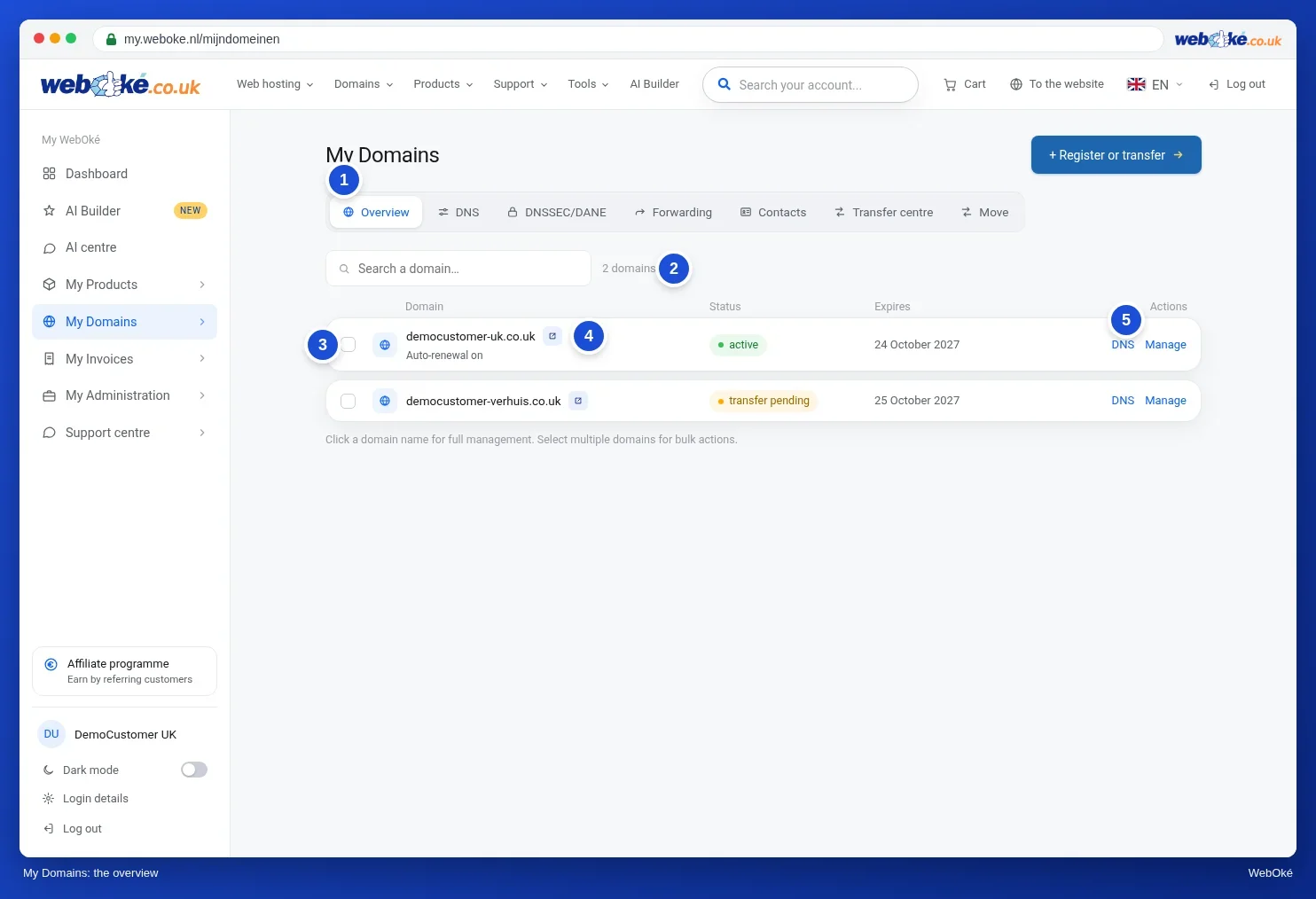
In My WebOké your domains are under My Domains. For each domain you see the status, the expiry date and whether it renews automatically. The domain page has the cards Nameservers, Domain contacts, Renewal and Advanced. Other registrars use different names, but you'll find the same information.
Summary
- You get a right of use for a set period, not ownership forever.
- The registry manages the extension and the rules, the registrar is your front desk, and you are the registrant.
- A domain name is only the name: DNS, hosting and email are separate parts that can be hosted elsewhere.
- As a registrant you must provide correct details, be reachable and renew in time.
- An overview of all your domains is the basis of good management.
Quiz
Exercise
Exercise D1.1: Mapping your domains. Make a first list of all the domain names you or your organisation use, including old and forgotten ones. Check your invoices and your email program (which addresses do you use?), and ask colleagues or your web developer. For each domain, note who the registrant is, which registrar it's with and where the website and email are hosted. If you don't know something, write "don't know": that's exactly what you'll find out in the next lessons.
Exercise D1.1: Mapping your domains
You do this exercise yourself; no one checks it. Tick off what you've done and mark the exercise as done.
A complete list (including defensive and old names) showing the registrant, the registrar and where the website and email are hosted for each domain. Say honestly 'I don't know' where something is unknown, with a plan to find out. The most important domain is usually the one in your email address.
Your ticks and notes only stay in this browser; we don't send them anywhere. If you're signed in, we only save in My courses that you've done the exercise.