
Module 3 · 3.1
Checking availability and registering
Module 3: Registering and the registrant · Reading time: 9 minutes
Learning objective: After this lesson you can look up a name, prepare a registration properly and explain what happens after you order and when your name starts working. You will also know how to handle many names at once.
Key concepts: availability, free or taken, WHOIS and RDAP, quarantine, released name, registration period, nameservers at registration, when does it work, bulk registration
Free, taken or something in between
In module 2 you chose a name and an extension. Now you want to know whether it is still free. You look that up at a registrar: you type in the name and see whether it is free or taken. Behind the scenes, the registrar asks the registry, or checks the public data via WHOIS or RDAP (lesson 4.1).
"Free" means: the registry does not currently know the name as registered. That is a snapshot. Until your registration has actually been processed, someone else can get there first. If you hesitate for a long time, the name may be gone when you come back.
"Taken" has more meanings than you might think:
- The name is simply in use by someone else.
- The name belongs to you or your organisation, but is held at another registrar. In that case you do not register it, you transfer it (module 6).
- The name has been cancelled and is in quarantine. For .nl this lasts 40 days, and during that time only the previous registrant can get it back. After that it is free for everyone. In the .nl Whois you then see the status "In quarantine" with the date on which it becomes free. .eu and .be also have 40 days of quarantine, while .de has a recovery period of 30 days (lesson 5.2).
- The name has been excluded by the registry. For .nl this concerns a few names, such as www.nl and mail.nl.
If a name is taken, check what is on it before you think any further. If there is an active website of a company, look for another name. Do you get an email from an unknown party saying that "someone else wants to register your name" and that you have a "first right"? No such right exists. This is a well-known form of fraud (lesson 7.1).
Released names: watch out for their history
A name that is free may previously have belonged to someone else. That does not have to be a problem, but it can be. Links to the name may still exist, and people may still send mail to the old addresses. It works the other way round too: if you let an old name go, someone else may receive your mail. That is why SIDN warns previous registrants if their cancelled name still receives a lot of mail. In lesson 5.3 you will read more about released names and how they get snapped up.
Practical tip: look up a released name in a search engine and check whether it has been used for anything unpleasant in the past. A name with a bad reputation with spam filters or in search results is hard to clean up.
Preparing a registration
The registration itself takes only a few minutes. The preparation decides whether you will be happy with it later. List these points before you order:
- The registrant. Whose name will the domain be in? For a business, that is the business, not the web developer or an employee. Lesson 3.2 covers this in detail.
- Correct details. Name, address and an email address you actually read, preferably on a different domain from the one you are registering. See lesson 3.3.
- The extensions. Are you securing only the .nl, or also the .com or .eu? And variants with and without a hyphen? Decide this now, not after someone else has taken them (lessons 2.2 and 7.2).
- The nameservers. When registering, you specify which nameservers handle the DNS for your domain. Usually these are your registrar's default nameservers. If you want to manage the DNS elsewhere, you enter your own nameservers; you need at least two. You will learn exactly what nameservers do in the DNS course (lesson 2.3).
- What goes on it. Will you link the domain to a hosting package, to a mail provider, or to nothing yet?
- The registration period. You usually register for one year. For .com and other gTLDs you can also register several years in advance, up to a maximum of ten years. For .nl the registry does not show an expiry date: how long your registration runs and how you renew it is something you agree with your registrar (module 5).
After ordering: when does it work?
After you order, your registrar passes the registration on to the registry. Then three things happen, one after the other:
- The registry records the name. From that moment you are the registrant. For .nl you briefly see "Requested" in the Whois and then "Active". If there are no nameservers yet, it says "Inactive": the name is yours, but it does not work yet.
- The registry points to your nameservers. When a computer asks for your name, the registry refers it to the nameservers you specified.
- Your nameservers answer. That is where the records for your website and your mail need to be. Without those records there is nothing to see and no mail arrives.
How quickly this happens differs per extension and per registrar. If you notice that one person can already see your site and another cannot yet, read the DNS course on propagation.
A common mistake: putting the new address on business cards and having mail sent to it right after registering, while the mailbox has not been set up yet. Test first that your website and mail work.
Many names at once
Do you have ten, fifty or hundreds of names to register or transfer, for example for a brand in every country or for a web agency with many clients? Then ordering them one by one is error-prone. Most registrars have a bulk feature: you paste a list of names, the registrar checks them all and you set the nameservers for all names in one go. With bulk, pay extra attention to the registrant: do not accidentally put all the names in the name of one person who has nothing to do with them.
In practice: how it works at WebOké
At https://www.weboke.nl/en/domeinregistratie you type a name in the "Type your domain name…" field and click Check. You see whether the name is free or taken, and under "Other extensions for" the same name with other extensions. The search only accepts the letters a-z, digits and the hyphen. If you are logged in, you start in My Domains with the + Register or transfer button.

After searching, the Set up your domains window opens. There you choose the nameservers, the link to a package and the owner for each domain.
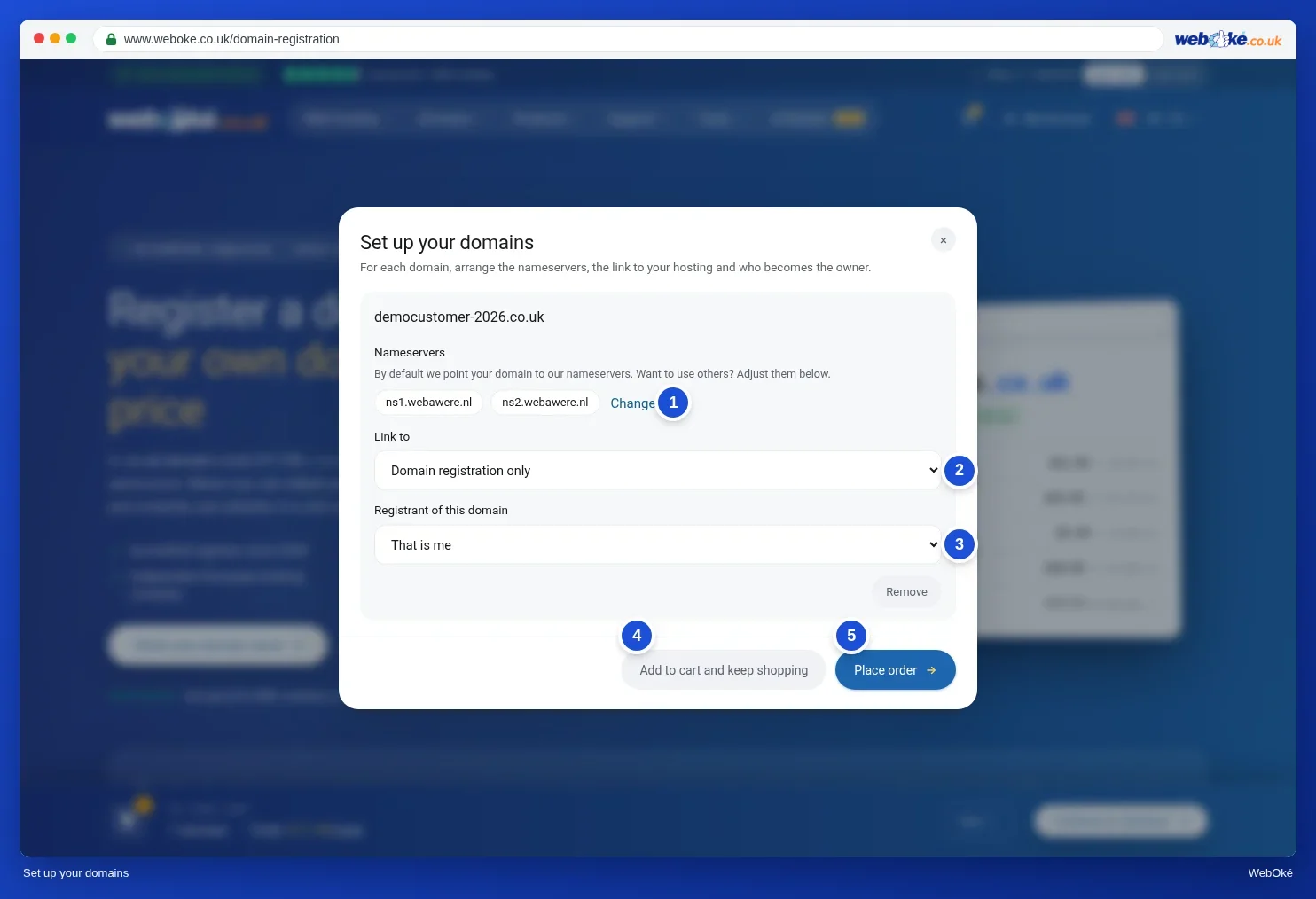
For many names at once there is Bulk register/transfer (https://www.weboke.nl/en/bulkdomeinen). You paste your list into the "Domains (one per line, transfer code may follow)" field and click Check. You choose the nameservers in one go: "Default WebOké" or "Own nameservers". You can add 500 names at a time. Other registrars work in a similar way, even if the buttons have different names.
Summary
- "Free" is a snapshot; "taken" can also mean that the name is yours or is in quarantine.
- A released name may have a history; look it up before you choose it.
- Decide in advance on the registrant, the details, the extensions, the nameservers and the period.
- After registration, the registry must point to your nameservers and the records must be there; only then do your website and mail work.
- For many names you use a bulk feature, with extra attention to the registrant.
Quiz
Exercise
Exercise D3.1: Preparing a registration. Choose a name you really want to register (or take a name you already have and pretend you are registering it again). Look it up at a registrar, without ordering. Then prepare the registration on paper.
Tick off:
- I have checked whether the name is free or taken, and if taken, what is on it.
- I have looked up the name in a search engine to see whether it has a history.
- I know who the registrant will be and with which email address.
- I have decided which extensions and variants I will secure.
- I know which nameservers I will specify and where the website and mail will be.
Fill in:
- Which name and extensions are you registering, and why these in particular?
- Who will be the registrant, and which email address will you use as the contact address?
- Which nameservers will you specify, and what needs to be there before your website and mail work?
Exercise D3.1: Preparing a registration
You do this exercise yourself; no one checks it. Tick off what you've done and mark the exercise as done.
A name with one or more extensions and a reason (target audience, country, variants against typos). The registrant is the organisation (private limited company, foundation, association) or the person themselves, never the web builder or an employee; the contact address is one that is actually read, preferably not on the domain itself. Name servers: the registrar's defaults or at least two of your own; they must hold records for the website (A/AAAA or www) and for email (MX), otherwise nothing works even though the name is registered.
Your ticks and notes only stay in this browser; we don't send them anywhere. If you're signed in, we only save in My courses that you've done the exercise.