
Ordering, transferring, moving, handing over or detaching a domain: all scenarios
In this article you'll read what you can do with a domain at WebOké: order, transfer, move between packages, hand over to someone else, detach or rename. Find your situation in the list below.
- 1. Ordering a new domain together with a hosting package
- 2. The domain name is already in our system
- 3. Moving a domain to another package
- 4. Detaching a domain to domain registration only
- 5. Moving a domain to another owner or another WebOké account
- 6. Replacing or renaming the (main) domain of your package
- 7. Frequently asked questions
1. Ordering a new domain together with a hosting package
Go to our web hosting and choose a hosting package. With the package, under What would you like to do?, choose one of these options:
- Register a new domain: the domain name doesn't belong to anyone yet. We check whether it's available and register it for you.
- Transfer domain: your domain is currently with another provider. Enter the domain name and the transfer code and we'll start the transfer. Also read How do I transfer my domain to WebOké?
- I already have a domain: you keep the domain at your current registrar, but your website and email are hosted with us. Afterwards, change the nameservers to our ns1 and ns2 yourself.
- Domain already at WebOké: you choose a standalone domain from your own account that isn't linked to a package yet. You then only pay for the package and your DNS records are moved along automatically.
- Choose later: handy if you're still undecided. You get a temporary address and choose your domain later.
To learn how to set the nameservers, the package and the owner for each domain, read Setting up your domain: nameservers, linking to your package and the owner.
2. The domain name is already in our system
While ordering, you may get a message that the domain is already managed by us. This means the domain is already in an account, either yours or someone else's. How you proceed depends on the situation.
2a. The domain is a standalone domain in your own account
Log in and choose the option Domain already at WebOké with the package. Select the domain there. When we process your order, we'll put it on your new package, together with your DNS records.
2b. The domain is already in another package of yours
Move the domain to the new package (see step 3), or detach it first (see step 4) and then select it when ordering with Domain already at WebOké. Please note: the website and email of this domain in the old package will then be deleted.
2c. The domain name belongs to someone else
For privacy reasons, the message doesn't show who manages the domain. If the domain belongs to someone you know, ask that person to hand the domain over to you (see step 5). If you believe you're entitled to the domain but can't get it, email support@weboke.eu. We'll help you out.
2d. You want to continue with the order right away
Choose Choose later with the package. You'll then get a temporary address. As soon as the order is active, link the real domain name via My Domains, tab Move.
3. Moving a domain to another package
If you have multiple packages in the same account, you can move a domain from one package to another yourself.
- Log in to My WebOké and go to My Domains › Move. You can also go to My Products › Domains per package and click Add domain or Move.
- Under Select domains, click the domains you want to move.
- Under Choose destination, choose the package they should go to.
- Click the button at the bottom right, leave Move DNS along checked, tick the two confirmation boxes and click Confirm move.
By default, your DNS records move along to the new package, so your email settings, for example, keep working. The website and email of the domain on the old package will be deleted, though. The new package needs a few more seconds to update the DNS on our nameservers. During that time your website may be briefly unavailable.
4. Detaching a domain to domain registration only
Want to keep a domain but no longer link it to a hosting package? Then move it the same way as in step 3 and choose Domain registration only as the destination.
The registration stays active and the domain remains yours. The website and email of that domain on the hosting will be deleted. Later, you can link it to a package again with Add to hosting, or select it in a new order with Domain already at WebOké.
5. Moving a domain to a different owner or another WebOké account
Are you selling your business, is someone else taking over your website, or do you want to take over a domain from someone else? There are a few options. They look similar, but they do different things.
- Account: your customer account in My WebOké, with your invoices and your login details.
- Package: a hosting or mail package in your account. It contains one or more domains.
- Registrant: the person or organisation registered with the registry as the owner of the domain (see What is a domain registrant?).
Which option suits you?
- Only change the registrant: the domain stays in your account, but is registered with the registry in someone else's name. You do this in the domain contacts, see Managing domain contacts in one overview. Please note: this change is applied directly at the registry, which makes the domain legally the other person's.
- Transfer to another WebOké customer: the domain, or an entire package with all its domains, moves to someone else's account. The registrant moves along with it. This is free of charge.
- Merge accounts: if you have two WebOké accounts yourself, you can merge them into one.
- Move to another provider: the domain leaves WebOké. See How do I request the transfer code/EPP token?
- Just let someone view or help: then you don't need to transfer anything. Invite that person as a user, see Adding an extra user to WebOké accounts.
Transfer to another WebOké customer
- In My WebOké, go to My Administration › Transfer. You'll see your hosting packages and your separate domain registrations.
- Click Transfer next to the package or domain.
- Enter the email address of the recipient's WebOké account twice, and your own password for confirmation.
- Click Transfer.
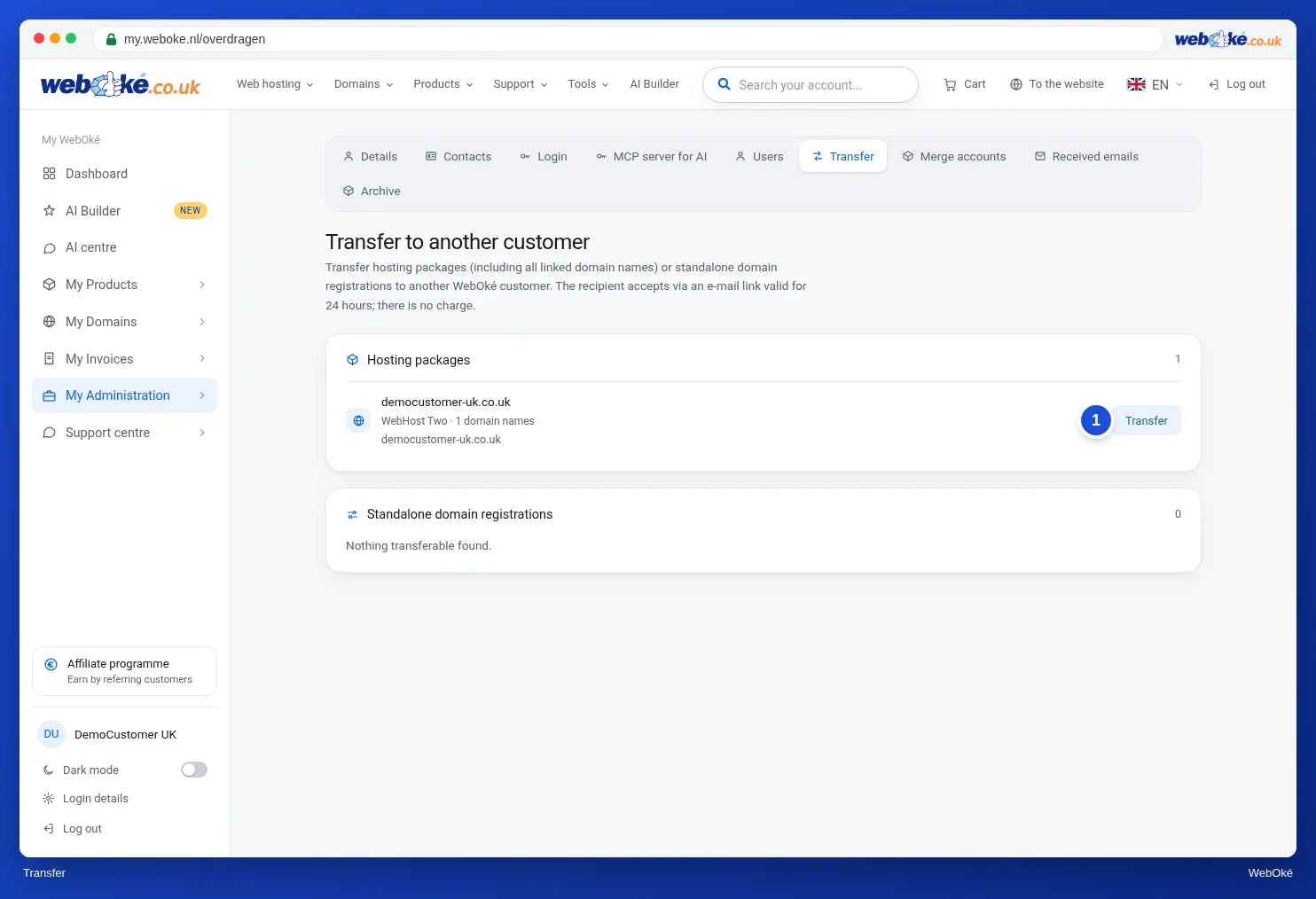
The recipient receives an email with a button to accept. That link is valid for 24 hours. The transfer only goes ahead once it has been accepted. If the recipient doesn't have an account yet, the email explains how to create one first. As long as the recipient hasn't accepted, you can withdraw the transfer with Withdraw transfer.
Good to know:
- With a package, all websites, email and data move to the new owner. Nothing changes in the DNS or the hosting: everything keeps working as usual.
- If there is still an open invoice for the package, you can only transfer it once that invoice has been paid. Invoices that have already been sent stay with you. New invoices will be in the recipient's name.
- A domain that is part of a hosting package can only be transferred together with the entire package. If you only want to transfer the domain, detach it first (step 4).
- Only the account owner can make transfers. You can't (yet) transfer reseller packages yourself.
- You can also transfer from the domain page (Advanced card) or at the bottom of a package's product page.
Do you want to take over a domain from another WebOké customer? Ask that customer to transfer it to your account's email address, and accept the transfer within 24 hours.
Merge accounts
Go to My Administration › Merge accounts. Services, domains, contact profiles, invoices, tickets and credit are moved to the other account. Nothing changes for the domains themselves, not even at the registry. The owner of the other account accepts within 24 hours.
Detailed explanation with screenshots: Transferring and merging accounts, Cancelling or transferring a domain and Domain contacts and changing the owner in the WebOké manual.
6. Replacing or renaming the (main) domain of your package
Moving on under a new domain name? Then you have two options.
Add the new name and let the old one redirect (recommended)
Add the new domain name to your package and turn the old name into a pointer or a redirect to the new one. That way old links and old email addresses keep working. See Domain Pointers and Site Redirection.
Renaming the domain in DirectAdmin
- Open DirectAdmin and under Account Manager click Domain Setup.
- In the top right, click Rename Domain.
- Select the domain under Old Domain and enter the new name under New Domain.
- Click Save.
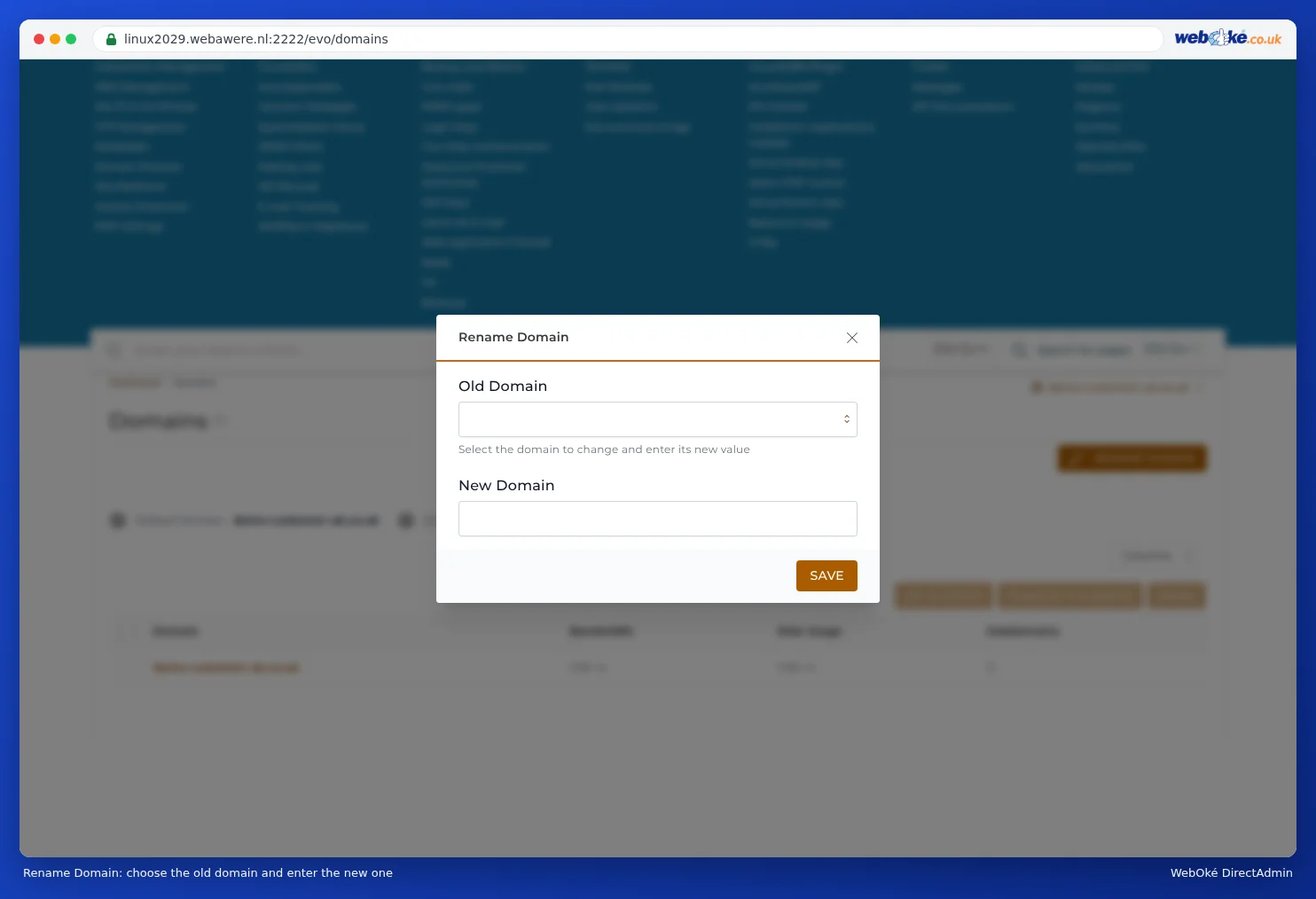
We check whether the new name is still available in our system. DirectAdmin moves the website, the email addresses and the DNS over to the new name. After that, the old name no longer works. Then update the following yourself:
- your email clients: the email address and the username change along with it;
- the website address in WordPress or another CMS: in WordPress, the WordPress Address and Site Address under Settings › General;
- the SSL certificate: request a new certificate for the new name (see Activating an SSL certificate).
Detailed explanation with screenshots: Deleting or renaming a domain in the DirectAdmin manual.
7. Frequently asked questions
Can I link one domain name to two hosting packages?
No. A domain name always points to one hosting server. Want different websites on different packages? Then use subdomains, for example shop.jouwdomein.nl on package A and blog.jouwdomein.nl on package B.
How long does it take until my domain is active?
When we add the domain to a package, it's usually on our nameservers within a minute. If you're transferring the domain from another provider, it can take longer because of DNS delays, in exceptional cases up to 24 hours.
What happens if the move fails?
Then we automatically get a notification, for example if a server is temporarily unreachable. We'll fix it or get in touch with you. You don't need to do anything.
Can I add a domain to my package myself in DirectAdmin?
Yes, for your own domains that aren't already managed elsewhere with us. If the domain is already set up somewhere else, you'll get a message with an explanation. Adding a domain in DirectAdmin is not the same as registering it: you always register a domain name through our website.
I used a temporary domain name. How do I link the real name?
Order or transfer the real domain name and then link it to your package via My Domains › Move. Not sure? Create a ticket and we'll set it up correctly in your package.
Need help?
Stuck somewhere? Email support@weboke.eu or send a WhatsApp message to +31 970 1025 5083. We're happy to help.
Want to register or transfer lots of domains at once? Paste them all in one go, see Registering or transferring many domains at once.