
Sending mail from your VPS and setting up reverse DNS
Want to send mail from your VPS, for example with your own mail server or from an online store? Then two things matter: port 25 and reverse DNS.
Port 25 is closed by default
Outgoing traffic to port 25 (mail between mail servers) is blocked by default. This prevents a hacked VPS from sending spam and getting our IP addresses blacklisted, which would affect all customers.
- Sending mail through an external service or your own mailbox (port 587 or 465, with login) works just fine. For most websites and online stores, that's the best choice.
- Want to run your own mail server? Create a ticket. We'll check together that everything is set up correctly and then open port 25 for you.
Reverse DNS (PTR)
Reverse DNS links your IP addresses back to a name, for both IPv4 and IPv6. Receiving mail servers check this: without proper reverse DNS, your mail often ends up in spam or gets rejected. The name must also match the name your mail server uses to identify itself (the HELO name).
Examples of a good name:
mail.yourdomain.nlif your VPS sends mailserver.yourcompany.nlorvps1.yourdomain.nlfor general use
Setting it up
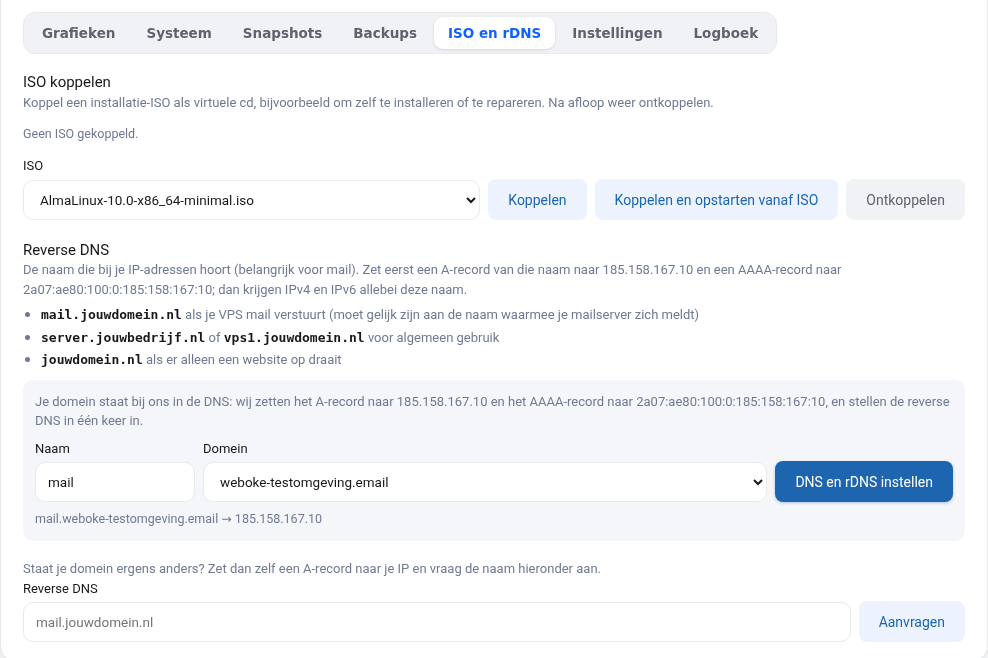
In your VPS screen, go to the ISO and rDNS tab.
- Is your domain in our DNS? Choose the domain and a name (for example
mail) and click Set up DNS and rDNS. We create the A and AAAA records, and within a few minutes the reverse DNS for IPv4 and IPv6 is in place. - Is your domain hosted elsewhere? First, at your DNS provider, create an A record pointing the name to your IPv4 and an AAAA record pointing it to your IPv6 (both are shown in your VPS screen). Then enter the full name under Reverse DNS and click Request: the reverse DNS will be set up right away.
Check the result with dig -x your-ip-address or nslookup your-ip-address, for both addresses. Make sure it matches both ways: the IP address returns a name, and that name returns exactly the same IP address with dig A (IPv4) or dig AAAA (IPv6). This is called forward-confirmed reverse DNS (FCrDNS). Gmail, Yahoo and T-Online explicitly require it. Recipients consider a generic name that only contains the IP address suspicious. So choose your own name, as shown above.
Gmail, Microsoft and T-Online
- Don't forget IPv6. If your VPS sends mail over IPv6, the IPv6 address must also have a matching reverse DNS. If it's missing, Gmail rejects your mail with
550 5.7.25, while mail over IPv4 arrives just fine. - Warm up a new IP address. A new IP address has no reputation yet. If you send a lot of mail right away, recipients such as Microsoft will throttle you or your mail will end up in spam. Start with a small amount of mail and increase it step by step.
- T-Online also requires the name in your reverse DNS to lead to a domain with a website that shows how to contact the administrator (in Germany this is called the Impressum). T-Online does not whitelist addresses.
Read more about these recipients in Mail to Outlook, Hotmail or T-Online delayed or rejected. What the error codes mean is explained in Mail delivery failed: how to read the error message and what the codes mean.
Reverse DNS with a hosting package
Don't have a VPS but a hosting package? Then you don't need to set anything up. Your mail goes through the WebOké servers, which already have proper reverse DNS with the server's own name, such as server64143.webawere.nl. That's exactly how it should be: recipients check whether the reverse DNS matches the server, not whether your own domain name is in it. Reverse DNS with your own domain name isn't possible with a hosting package anyway, because the IP address is shared by multiple customers.
Don't forget SPF, DKIM and DMARC
For good deliverability you also need an SPF record with your VPS IPs (ip4: and ip6:), DKIM signing by your mail server and a DMARC record. If your domain is with us, you set these up via DNS management under My Domains. Start DMARC with p=none and make it stricter step by step, see What is DMARC? Explained in plain language.
Want to learn more? Take the free course VPS and Linux server management, lesson 7.1 DNS to your VPS and reverse DNS.