
Cancelling products and domains, withdrawing a cancellation, and what happens next
In this article you'll learn how to cancel a hosting package or domain name, how to withdraw a cancellation and what happens to outstanding invoices. Web hosting and domain registration are separate products: if you cancel only your package, your domain simply stays registered, and vice versa.
Cancelling a hosting package
- Log in to My WebOké.
- Go to My Products and click Manage next to the package.
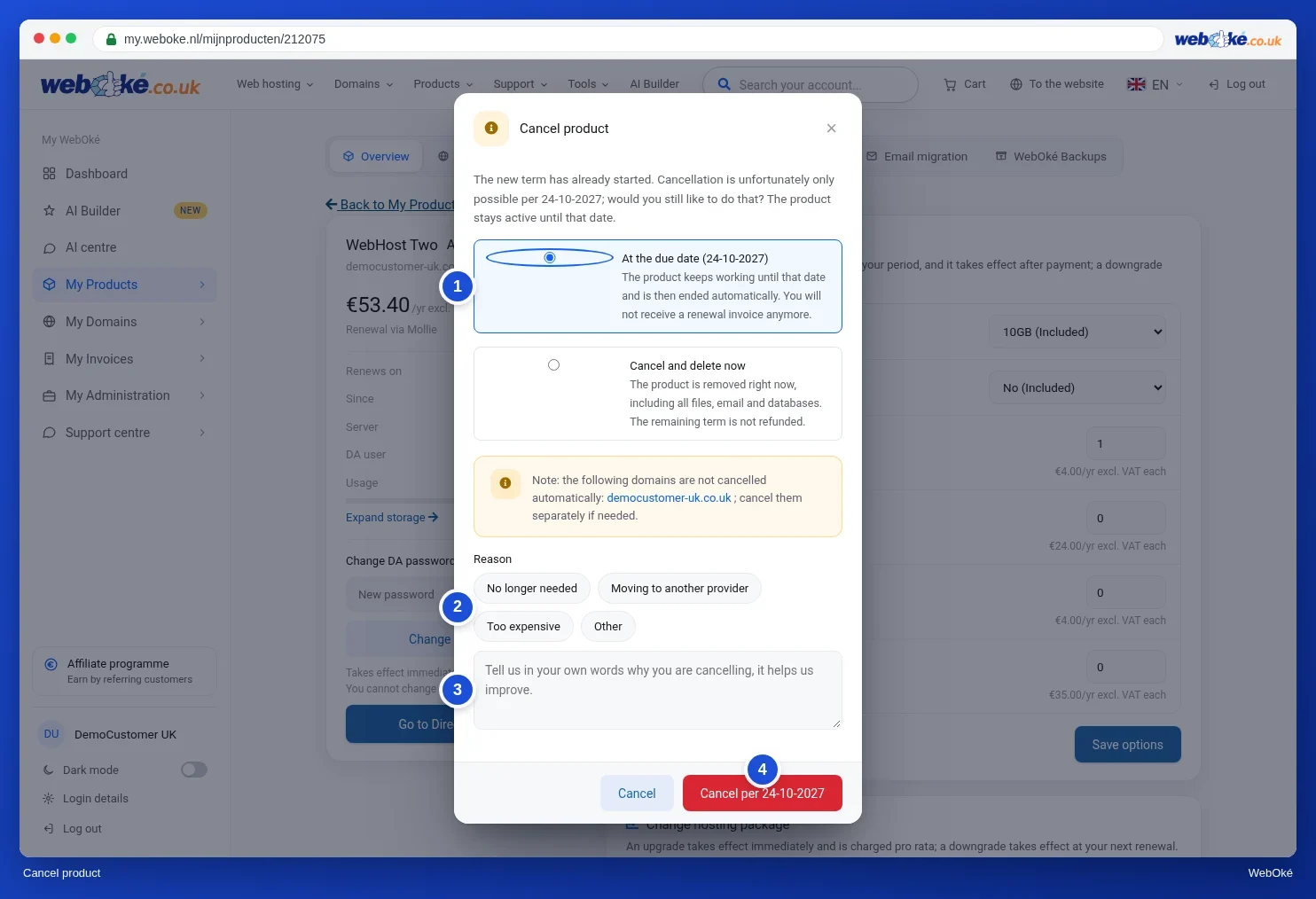
- At the bottom of the product page, click Cancel product.
- Choose when you want to cancel:
- As of the expiry date: the package keeps working until that date and then stops automatically. You won't receive a renewal invoice. This is the normal choice.
- Cancel and delete immediately: we delete the package right away, including all files, email and databases. You won't get a refund for the rest of your term.
- Choose a reason or type it in your own words. A reason is required.
- Click the red button, for example Cancel as of with the date.
After the end date, the package stops immediately; there is no grace period. So export your data before the expiry date. If you did forget something, we can restore a backup on request up to 30 days after termination. Request this via a ticket.
Cancelling a domain name
- Go to My Domains and click the domain name.
- In the Advanced card, click Cancel domain. You can also switch off Renews annually: that opens the same window.
- Choose Cancel (the domain stays active until the end date) or Cancel and delete immediately.
- Click the red button to cancel.
If the domain is part of a hosting package, that package is not cancelled along with it. The window gives you a link to cancel the package separately.
Please note: once a domain has expired or been deleted, someone else can register it. A deleted .nl domain first goes into quarantine for 40 days. During that time, only you can have it restored.
Checking or withdrawing your cancellation
- Package: the product page shows that the package has been cancelled. As long as it's still active, you'll see the Undo cancellation button there. Click it and the package simply continues.
- Domain: the domain page shows Will not be renewed. with the date on which the domain expires. Changed your mind? Click Undo cancellation in the Advanced card or switch Renews annually back on.
After you cancel a domain, a button to delete it immediately also appears. Only use it if you're sure you'll never need the domain again.
Received an invoice after cancelling or transferring?
We create the renewal invoice well in advance, around 35 days before the expiry date. If you cancel after that, the invoice is already outstanding. Here's how to sort it out:
- If a renewal invoice is already outstanding, the cancellation window lets you choose between cancelling as of the previous expiry date or the new expiry date. If you choose the previous expiry date, we credit the outstanding invoice and you don't have to pay it. If you choose the new one, you pay the invoice and can still use that term.
- If the new term has already started, the window tells you from which date you can cancel. The product stays active until that date.
- Have you transferred your domain to another provider? After a successful transfer, billing with us stops automatically. If you still received a renewal invoice for that domain, send us a ticket with the domain name and the invoice number.
Cooling-off period and money back
- If you order as a consumer, you have a 14-day cooling-off period. During that time you can withdraw from the agreement without giving a reason. You'll find how this works and the model form on the Right of withdrawal page.
- We register or transfer a domain name immediately after your order. That's why the right of withdrawal doesn't apply to domains. You confirm this with a tick box when ordering.
- The right of withdrawal doesn't apply if you order as a business.
- In addition, WebOké offers a 30-day money-back guarantee on hosting packages, email packages, Nextcloud, reseller packages, AI Builder, add-ons and renewals. This doesn't apply to domains either. The guarantee applies to both business and private customers. Cancelling alone isn't enough: request your refund via a ticket.
Want to withdraw or get your money back? Send us a ticket or email support@weboke.eu. In the case of withdrawal, we refund you within 14 days, using the same payment method you paid with.
Cancelling on behalf of a deceased person or a dissolved organisation
If the customer has passed away or the organisation has been dissolved, you can have the services cancelled on their behalf. Here's how it works:
- First secure anything that's still needed. Think of email, files and the domain name. If you want to keep the website or domain, have the package or domain transferred to another WebOké account instead of cancelling it. See Transferring and merging accounts.
- Cancel via the Cancel contract form. You don't need to log in for this.
- Attach supporting documents showing that you're authorised to do this on behalf of the customer, for example a death certificate or an extract from the Chamber of Commerce (KvK), and a copy of your ID. On a copy of an ID, make the citizen service number (BSN) and the passport photo unreadable.
Not sure what to do? Get in touch with us. We're happy to help you figure it out.
Detailed explanation with screenshots: Cancelling a product, withdrawing a cancellation or transferring and Cancelling or transferring a domain in the My WebOké manual.
You might also enjoy reading: The history of the domain name
Want to learn more? Take the free course Choosing and managing a domain name, lesson 5.3 Cancelling, recovering and released names.